 0
komentar
0
komentar
Now the topic is about YouTube Channel, As every body know YouTube is the largest Video Site owner by Google. Most of the people who works on Internet wants to Make Money through YouTube. YouTube provides a large platform to upload videos and Make Money through it.
YouTube Page Rank is 1 and it Earn Money higher then other. And it also gives opportunity to make money to us. If we upload Videos on YouTube and get Visitors then we can make extra money.

Now today in this post I will teach you how to make extra and extra money by doing some setting that is Annotations. Annotation is the best feature in YouTube, Because by this tool we can make video extra smart and get huge traffic. And also I will tell you How to change YouTube Channel URL/Username.
Note: Pop-up E-mail Subscription Light Box for Blogger
2- Click on Right side circle Picture
3- Click on Gear Icon Pic near by Creator Studio
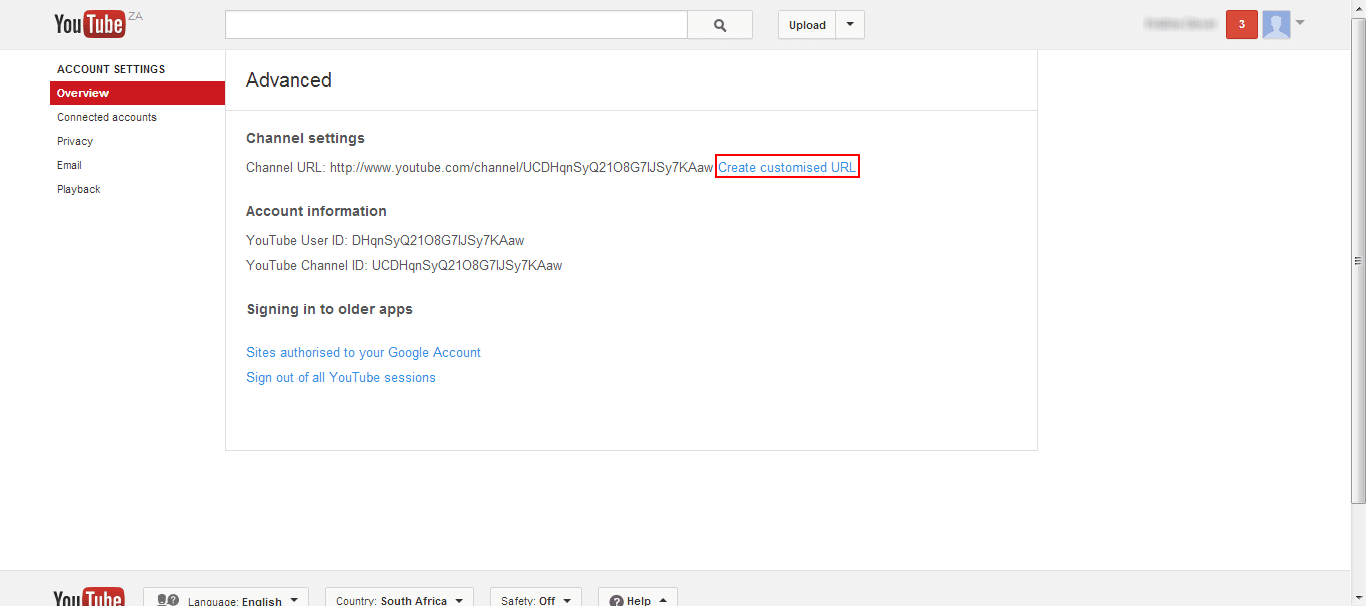
4- Hit on Advanced link
5- Now Click on Create Custom URL and write your desired URL.
Recommended: How to Unblock YouTube in Pakistan

1- Login your YouTube Account
2- Go to Video Manager
3- Select single Video and click drop down arrow
4- Now Hit on Annotations
5- Here give any Video URL or Callouts on Video.

Once you apply these trick on your Video, definitely you will be able to get huge traffic on YouTube Videos. If you have any question and query feel free and leave your thought in comment section. Also dont forget to Share this post with your Friends on Social Media Sites.
YouTube Page Rank is 1 and it Earn Money higher then other. And it also gives opportunity to make money to us. If we upload Videos on YouTube and get Visitors then we can make extra money.
Now today in this post I will teach you how to make extra and extra money by doing some setting that is Annotations. Annotation is the best feature in YouTube, Because by this tool we can make video extra smart and get huge traffic. And also I will tell you How to change YouTube Channel URL/Username.
Note: Pop-up E-mail Subscription Light Box for Blogger
Steps to Change YouTube URL:
1- Login your YouTube Account2- Click on Right side circle Picture
3- Click on Gear Icon Pic near by Creator Studio
4- Hit on Advanced link
5- Now Click on Create Custom URL and write your desired URL.
Recommended: How to Unblock YouTube in Pakistan
How to Use Extra Advances YouTube Features:
2- Go to Video Manager
3- Select single Video and click drop down arrow
4- Now Hit on Annotations
5- Here give any Video URL or Callouts on Video.
Once you apply these trick on your Video, definitely you will be able to get huge traffic on YouTube Videos. If you have any question and query feel free and leave your thought in comment section. Also dont forget to Share this post with your Friends on Social Media Sites.


