Tampilkan postingan dengan label pakistan. Tampilkan semua postingan

Kamis, 12 Mei 2016

Debit Card How to Apply and Verify Payoneer Account in Pakistan In Urdu Hindi Video

,
Hello! There is another Complete Guidance that How to Apply and Verify Payoneer Account. Payoneer is Online Banking System that provides a Master Card. Payoneer is World famous Banking system. Its supports up-to 200 countries. With this Bank you can receive your money from any person and from any country, and you send your money in any country to any person. You can also use this bank to withdrawal your money. If you apply for this bank account, then very positive think is you receive a master debit Card from this company. So you also use this card for Online Shopping around the world. Must Watch Video Below with Useful Information.
You can also use this Company for US Payment Service.

US payment service with Payoneer

How to Apply Payoneer Debit Card?

Firstly you Go to Payoneer Prepaid Debit MasterCard through this link Below

Sign Up for Payoneer

Get Earned $25 As a Reward:

If you open an account through my link of Payoneer Bank, Then You and Me get $25 as Gifted By Payoneer Company. And this Procedure is called Referral system. You can also register on Payoneer Prepaid Debit MasterCard by clicking on the Banner Below:

Send-and-receive-payments

Now Hit on Sign Up Button
Now you have 4 steps (Personal details, Contact Details, Security Details, Almost Done)
Fill the blank boxes with your correct personal information
Complete all options for applying Payoneer Prepaid Debit MasterCard
After this you receive an E-mail that you give in Contact Details
By clicking the link on Payoneer in E-mail to get complete authority
You have almost Done.

Also Apply For Payza Bank: Hit On Link Below:
Sign up with Payza today

Now Verify your Account To Get Master Card:

For Verify your Account Payoneer Demand with you to send him a Government Issued National Identification Card (ID Card), Driving License Card or Other government Identification Proof. 
You can send National Identification Card (ID Card).
Payoneer Service check your National ID Card and send E-mail on your given E-mail ID.
Now you will just gives some answers, like (Why you apply for Payoneer Card, What is your Company Name... Like this).
So you have Done. Within the 20 Days you receive a Payoneer Prepaid Debit MasterCard.

Also See Earn Money With PTC Sites:

You should apply for Payoneer Card through above given link. With this Service you Receive, Send, Withdrawal your Money and also do Online Shopping around the World. 
If you have any Website or working online Marketing, then you must need this Card for Send and Receive Money and Withdrawal Money. This Bank also provide US Payment service. So you receive and transfer your money from any global Bank that dose not support in Pakistan.


I hope this Article is helpful and interesting for you. Please share this Post with your Friends and Relatives on Social Media Sites as a Favor. You also Share your thoughts in comment Section. Thanks for All! *
Read more

Kamis, 05 Mei 2016

Unblock Youtube in Pakistan Without any Proxy and Software

,
Unblock Youtube in Pakistan Without any Proxy and Software

Unblock youtube in Pakistan without any proxy and software is a top method to use it at its actual speed.As the youtube is banned in Pakistan and no longer been running there. Many of people use proxy server, proxy and many others setups for this purpose.But these methods do not work precisely and it could not run as it on real condition.By using these methods computer gone hard and also the internet speed get down.I used the zenmate extention in chrom but it was all in vain iause it could not run the youtube at its actula speed and also it did slow the system

Now its not longer been a problem for us; we come with one of the top unblock youtube methods with which you could use it at its appropriate condition and also this method would not hard you computer and internet speed.

How to Unblock Youtube With a Top method :

The method consists of several steps through ich you ll be able to unblock it
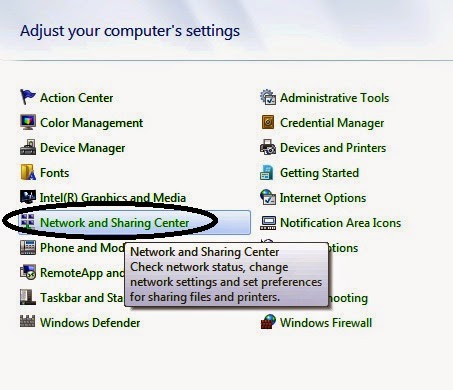
Step#1
  • Go to you computers control panel and click on Network and Sharing Center as shown below
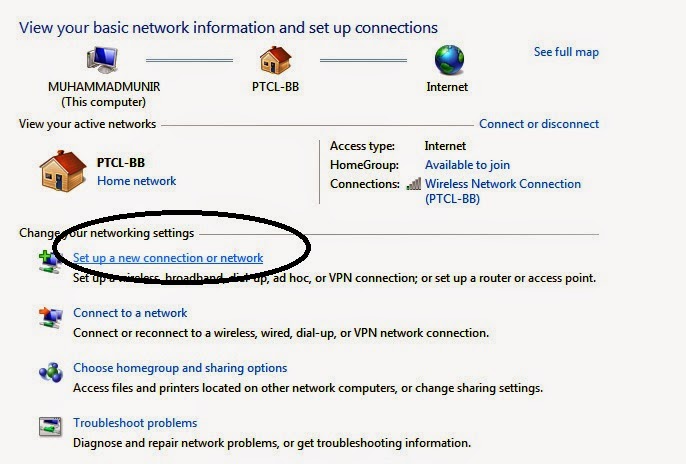
    Step#2
    • Then select the option of set up  a new connection and network

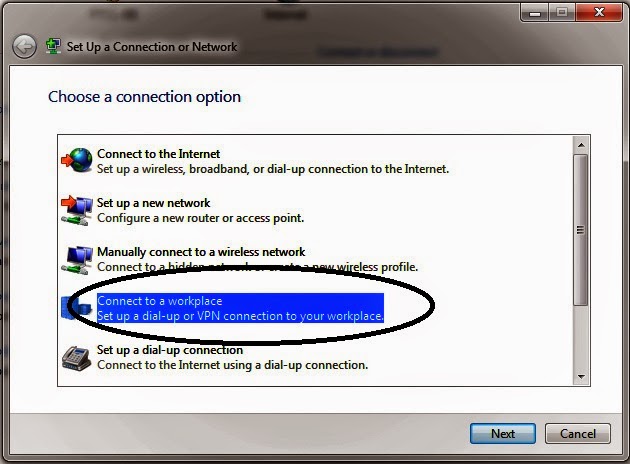
      Step#3

      • A tab would be appear and then select connect to work place

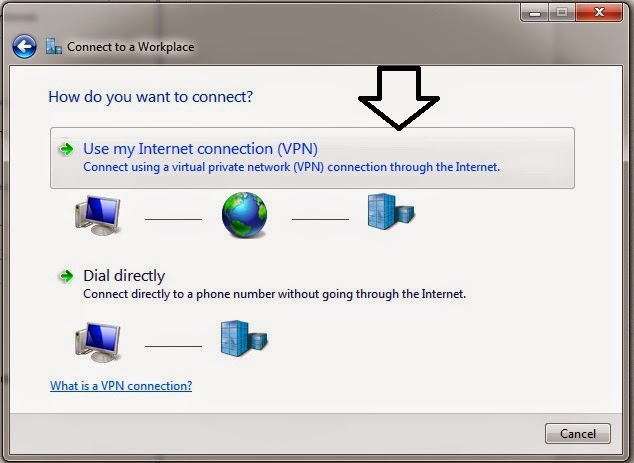
        Step#4
        • After that click on Use my Internet Connection (VPN)

          Step#5
          • Then provide with the following VPN information 
          USA BEST VPN 
          vpn server        : us.mybestvpn.com
          vpn username   : mybestvpn
          vpn password   : freevpn
          vpn protocol     : PPTP VPN

          now past the us.mybestvpn.com in internet address option and click on next


          Step#6
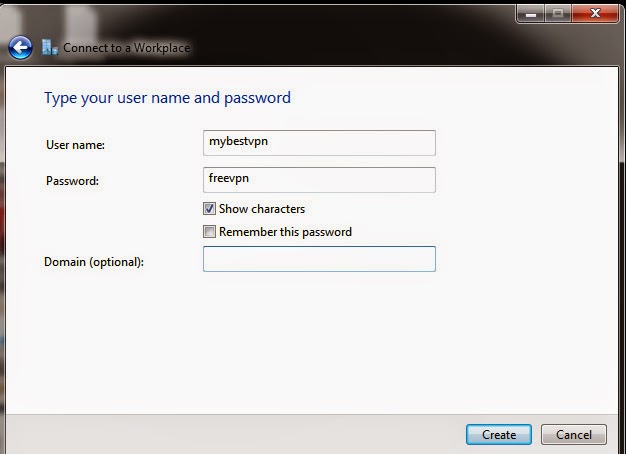
          • Now provide with username and password as shown below and click on create 


            Step#7

            • Finally click on connect now and it would probably will take 10 to 15 seconds to check the process 
            Step#8
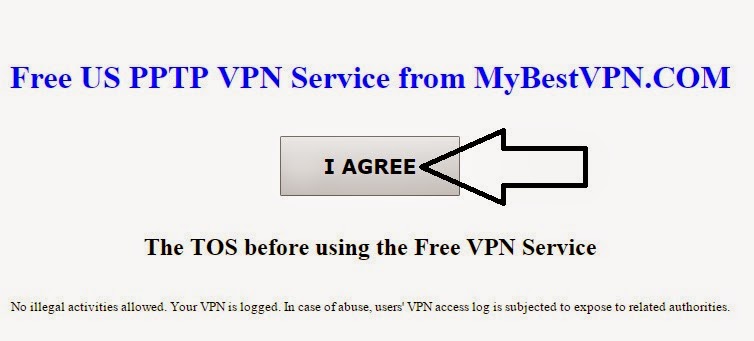
            • In last step open any website on your default browser then it redirects to the page and just click on I Agree Now you are ready to use your connection 
            Now you are ready to use the youtube in Pakistan. Just open the youtube and start with it.Its absolutely a best and one of the top method to unblock youtube and you can use the same method to use the unblock websites in pakistan and also can change your ip address to us IP address 

              Read more

              Rabu, 06 April 2016

              PayPal in Pakistan How to Apply and Verify Paypal Account to Right Way In Urdu Hindi Video

              ,
              PayPal is a Online Global Bank that offers you Send and Receive Money from anywhere. You can also do Online shopping with this bank. There are thousands of foreign companies who are paying you Money for different Online work like freelancing, Host-gator, Click to earn, Reviewing Sites and much more. Many renowned Corporation such as Fiver, eBay, Amazon, BuySellAds etc are allow you to receive your working money through Paypal, but the problem is that Paypal is not supported some regions including Pakistan. For some reasons use of Paypal is very important in Pakistan for some peoples, mostly those who worked online. Therefor we use alternative method for make an verified account on Paypal. This method is really a useful and helpful for us . So Lets get started...
              Also Must Watch Video Below for Useful Practical Training.
              How-to-verify-paypak-in-Pakistan

              How to Create an Account on Paypal?

              Withdrawal money from paypal

              In order to create an Paypal account, you first make an account on Payoneer Bank. It gives us a option that is US Payment Service. By this method you really get a verified Paypal account and withdrawal your Paypal money through Payoneer. 

              SignUp For Payoneer:


              For signing up in Payoneer go to Payoneer dot com. After signing up Payoneer ask to you Government issued ID Card, Driving license scan for Verify account. Once your verification is complete, after this they send you a Master Debit Card, which will shipped at your given address in maximum 20 to 40 Days.


              • Signup for Payoneer Prepaid Master DebitCard Now

              When your Master Card is approved you will receive an E-mail about "if you are interesting in US Payment Service". For this completion you must replay back with your some details via E-mail. Withen 2 or 3 days Payoneer team reviewed your details and send you a E-mail with  Virtual US account number Routing number.
              Now you get US Resident Details yet.

              SignUp For Paypal:

              Now for getting a Paypal account you go to Paypal.com and create an account using United States as your Country. You would also need US resident Name and Detail. For getting this purpose use 
              Fake Name Generator. So you generate Fake Name and Detail and Save all these things. Basically you need any address as United States and Phone No. Use your real Name in Paypal first name and last name Box. Once you have Done you verify with your E-mail ID by clicking on verify link in inbox.

              Now the time is attach your Payoneer Bank with Paypal Bank for Withdrawal money. First click on "Get Verified" Here you have two options, So you click on "Bank" and fill in the details which Payoneer already has send you via E-mail. Otherwise you take this details from Payoneer Home Page click on "Receive Payments" > "My US Payment Service Profile". In this page you collect your Routing Number and Account Number which is used for vitrifaction in Paypal. After giving this information in Paypal, Paypal will send two very small test amount to your Payoneer account withen 2 or 3 days. When you receive this small amount in Payonner account you just go to Paypal account and verify this amount by writing this exact amount in given box and you are done. Now you be called a proud owner of Paypal Account in Pakistan.

              Also Click Here to Make Money with FaceBook:

              How to WithDrawal Paypal Money?

              To withdrawal Paypal Money you would send paypal funds in your Payoneer account as your need. Now withdrawal this money through ATM at MCB Bank, City Bank, Standard Charter Bank with your Master Card. Payoneer also supports Global Bank transfer that is money can also be sends directly to yous Pakistani Bank account. For more Details visit Payoneer Affiliates.


              Paypal in Pakistan | How to Apply and Verify... by onlineexpert


              Paypal in Pakistan | How to Apply and Verify... by onlineexpert
              Thanks for reading this Post. You can also give me a Favor by Sharing this Post with your Friends and Relatives on Social Media Sites. If you have any Question Please tell me freely in Comment Section.
              Read more

              Selasa, 29 Maret 2016

              Unblock Websites How to Open YouTube In Pakistan Video Tutorial

              ,

              Unblock Sites : How To Open YouTube In Pakistan....

              Now Zubair Rehman Introduce you a very interesting topic, that is How to Open All banned Sites In Pakistan...
              Due to This Topic I can say 2 discussion which is..
              • How to Open YouTube In Pakistan
              • How to Open Block Sites In Pakistan
              You can Open YouTube and All Block Sites without using any Soft Ware and any Proxy.
              Nowadays many Peoples used different proxies and other Soft ware for the purpose to open Blocked Sites.. But these Soft ware and Proxies give result slow the speed of Internet and computer.
              So thats why People become Dishearten.
              Passage of Time New Soft ware, Proxies and Extension Developed, Im telling about Extension that is ZenMate. ZenMate is Google Product ..
              We can add ZenMate in any Browser like.. Google Chrome, Opera.

              How to Add ZenMate in Browser :

              1. Open your Browser.. like Google Chrome, Opera Mini
              2. Go to Setting > Extension
              3. Write > ZenMate
              4. Click on the Box {add to extension}
              5. Click Here
              So You Done it....
              Its Speed is Very Wonder full...

              See Video Below .. 


              You can also Read Make Money With YouTube .

              I assure that You understand my Topic and Video..  
              Read more
               

              Sharing Information Copyright © 2016 -- Powered by Blogger